Customer support for CX teams
- Prospecting · Business Development
- Support analytics · Customer Service
- Social listening · Social Listening
- Community insights · Community Management
- Creative research · Content Strategy
- AI visibility · AEO/GEO Optimization
- User research · User Research
- Competitive intelligence · Competitor Intelligence
Find your top contact drivers across 100% of conversations
Every ticket, chat, call, and review, labeled by root cause and tagged back in your help desk. When a driver spikes, Siftree traces it and drafts the fix.
Ask from Claude, ChatGPT, or your own agent. Siftree connects the sources and runs the saved work.
Customer support
Inbox
- Ticket #48211 3m “I redeemed 500 points and nothing showed up at checkout.” Rewards points missing 3rd contact in 4 days
- Dana R. · Live chat 9m “Paid in the app and my points never applied.” Rewards points missing
- Call · 4:12, transcribed 22m “…third time asking where my order is.” Shipping delay
Contact driver · W41
Rewards points missing
Investigated 312 conversations · 18s
Started Oct 3, the day mobile checkout v4.2 shipped. 61 customers have asked more than once.
Suggested actions
2 open- Tag 312 conversations in Zendesk
- File a bug with 12 quotes attached
- Every channel
- Labeled by root cause
- Escalation risk
- Spike detected
- Background investigation
- Writes back to Zendesk and Linear
- Zendesk
- Intercom
- Call recordings
- App Store
- Google Play
- Trustpilot
- Zendesk
- Intercom
- Linear
- Jira
- Slack
From every conversation to the fix.
Four stages your team already runs by hand, done on every conversation and every week.
Help desk, chat, call recordings, and app-store reviews in one place. Calls are transcribed on the way in.
Connections · Lumera
| Source | Volume | Status |
|---|---|---|
| Zendesk Help desk | 12,904 tickets | Connected |
| Intercom Live chat | 3,118 chats | Connected |
| Call recordings Call recorder | 1,406 calls · transcribed | Syncing |
| App Store Reviews | 512 reviews | Collected daily |
| Google Play Reviews | 388 reviews | Collected daily |
| Trustpilot Reviews | 204 reviews | Collected daily |
| Linear Issue tracking | Bugs filed by agents | Connected |
| Slack Alerts | #cx-leads | Connected |
- Native connectors
- Calls transcribed
Support work that’s done before anyone asks.
Each agent runs on a trigger or a schedule, shows its evidence, and waits for a person when you want it to.
-
Tag every conversation
- When
- A ticket, chat, call, or review comes in
- Does
- Labels contact driver, sentiment, and escalation risk from your taxonomy.
- Writes
- Writes the tags to the ticket
-
Escalation router
- When
- High escalation risk, or a 3rd contact in 4 days
- Does
- Raises priority and adds the customer’s history as an internal note.
- Writes
- Assigns the ticket to Tier 2
-
Bug filer
- When
- A driver spikes after a release
- Does
- Finds the release, the platform, and the customers affected.
- Writes
- Files a bug with counts and quotes
-
Deflection fixer
- When
- A driver has no matching help-center article
- Does
- Drafts the article and a macro from your best agent replies.
- Writes
- Saves both as drafts
-
Spike watch
- When
- Any driver grows 25% week over week
- Does
- Posts the driver, the trend, and three quotes.
- Writes
- Alerts #cx-leads
-
Monday driver report
- When
- Mondays at 8:00 am
- Does
- Writes the cited weekly report: what grew, what shrank, and what to fix.
- Writes
- Sends it to CX and product leads
Stop guessing from 2% of tickets.
QA sampling reads a handful of conversations. Siftree reads all of them, the same way, every day.
| Today: Zendesk tags + 2% QA sampling | With: Customer support |
|---|---|
| QA reads 2% of conversations | Every ticket, chat, call, and review |
| Tags agents forget to apply | 14 drivers, applied the same way and written back |
| Anecdotes product can ignore | A Linear bug with counts and quotes |
| Issues found three months late | An alert the week a driver jumps |
| Help articles written after the fact | Drafts ready when a gap appears |
Everything a CX lead checks on Monday, already done.
-
Every contact driver ranked by volume and week-over-week change, across tickets, chats, calls, and reviews.
-
Thresholds you set, posted to Slack or email with the quotes that explain the jump.
-
A cited weekly report for CX and product leads. Every claim links to the ticket, call, or review behind it.
-
Every conversation and its labels in a database you own. Filter it, export it, or ask it questions from Claude or ChatGPT.
Contact drivers · Week 41
18,240
conversations this quarter 100% labeled · no sampling
- 1 Rewards points missing 312 ▲ +41%
- 2 Shipping delay 268 ▼ −18%
- 3 Packaging defect 154 ▲ +6%
- 4 Product usage 141 ▲ +2%
- 5 Subscription change 118 ▼ −4%
+ 9 more drivers · 412 contacts
Connects to the stack you run support on.
Native connectors for your help desk and call recorder, public reviews collected for you, and write-back where your team works.
- Zendesk Help desk
- Intercom Help desk
- Call recordings Call recorder
- App Store reviews Reviews
- Google Play reviews Reviews
- Trustpilot Reviews
- Google Maps reviews Reviews
- Reddit Community
- Discord Community
- Linear Issue tracking
- Jira Issue tracking
- Salesforce CRM
- Slack Alerts
- Email Reports
- Survey exports Your systems
- CSV / API Your systems
- Claude MCP
- ChatGPT MCP
The numbers your team already reports.
Customer support measures your own KPIs from the same labeled records, every week, with the source one click away.
Customer support
Dashboard
-
Contact rate
Contacts per order or active customer, by driver.
Last 12 weeks
-
CSAT by driver
Which root causes pull satisfaction down the most.
Last 12 weeks
-
Time to detect
Days between a new issue appearing and the team knowing.
Last 12 weeks
-
Deflection rate
Contacts avoided after a fix or help-center update ships.
Last 12 weeks
Yours to change. Just ask.
This workflow isn’t a fixed product. It runs on your rules and your data, and it changes when your team does.
- Change it by asking.
- Add a label, a rule, or an alert in a sentence. Siftree shows the change and waits for your approval.
- Read every rule.
- Scoring, labels, and triggers are saved in plain language, so anyone on the team can see why it did what it did.
- Keep the data.
- Every record lands in a database you own. Export it, or query it from Claude or ChatGPT through Siftree MCP.
Customer support
/ Change requestAdd a “refund abuse” driver, and alert #trust when it passes 20 conversations a week.
Proposed changes · 3
- New driver “Refund abuse”, with rules drafted from 40 tickets
- Re-label the last 90 days so the trend starts in July
- Alert #trust when “Refund abuse” passes 20 a week
- Route VIP tickets to Tier 2
- Add a churn-risk score
- Split drivers by app version
- Send the report to #product
Ways teams use Siftree.
Copy one into your Siftree-connected agent and swap in your own channels and dates.
-
“What are the top five reasons customers contacted us this month, by channel?”
→ Driver ranking -
“Which contact drivers grew fastest after the October release?”
→ Trend chart -
“Where do refund requests and cancellation language show up together?”
→ Risk segment -
“Which drivers have no matching help-center article?”
→ Deflection gaps -
“Summarize this week's escalations for the CX standup.”
→ Weekly brief -
“Alert me when any driver grows 25% week over week.”
→ Alert
Before you connect your help desk.
Is Siftree the right tool for finding contact drivers?
Siftree builds and runs a custom support analytics workflow for CX teams. It reads every ticket, chat, call, and review, labels each by root cause from your own taxonomy, writes the tags back to your help desk, and alerts you when a driver spikes. It's the better choice if you want every conversation covered instead of a QA sample, across more than one channel. If you only need to score agent performance on calls, a conversation-intelligence tool is the narrower fit.
What can it change without a person?
Only what you allow. Each agent is set to run automatically, draft for review, or ask first, and every action is logged with the evidence behind it.
Who can see our data?
Access is scoped to the channel and the accounts you grant. Tasks run in an isolated sandbox, creating or running a task requires approval, and every action is written to an activity log.
Do you sample conversations?
No. Siftree labels every conversation in the window you choose, so small but fast-growing drivers show up before they become big ones.
Can we use our own taxonomy?
Yes. Paste your existing tags or let Siftree propose a taxonomy from a sample. Labels come from a fixed list, so trends stay comparable over time.
Does it handle phone calls?
Yes. Call recordings are transcribed and labeled in the same database as tickets and chats.
Can we work from ChatGPT or Claude?
Yes. Connect Siftree to your supported client and ask it to work with your authorized data. Siftree stores the databases and runs saved tasks on a schedule, so the work can continue after the conversation ends.
Do we need engineers to set this up?
No. Connect your tools, describe what you want in plain language, and approve the setup before anything runs. Changing it later takes a sentence, not a ticket.
Make the right call for your team.
- Siftree support analytics workflow vs Enterpret: contact drivers, taxonomy, and action
- Siftree support analytics workflow vs Medallia: root-cause reports and frontline action
- Siftree support analytics workflow vs Qualtrics: contact drivers or a broader CX program?
- Siftree support analytics workflow vs unitQ: contact causes or conversation quality?
- Enterpret alternatives for customer feedback intelligence
- Medallia alternatives for CX and support analytics
- Qualtrics alternatives for customer feedback and support analytics
- unitQ alternatives for support intelligence and quality
- How to combine support tickets and app reviews into a driver report
- How to evaluate customer intelligence software with your own data
Customer support
Find your top contact drivers across 100% of conversations.
- Cited. Every claim links to its source.
- Your call. Each agent runs on its own, drafts for review, or asks first.
- Sandboxed. Tasks run in an isolated sandbox.
- Scoped. Access limited to what you grant.
The Siftree suite
Start with a template and your own question.
Explore a workspace, adapt a prompt, and put the workflow to work through your existing agent.
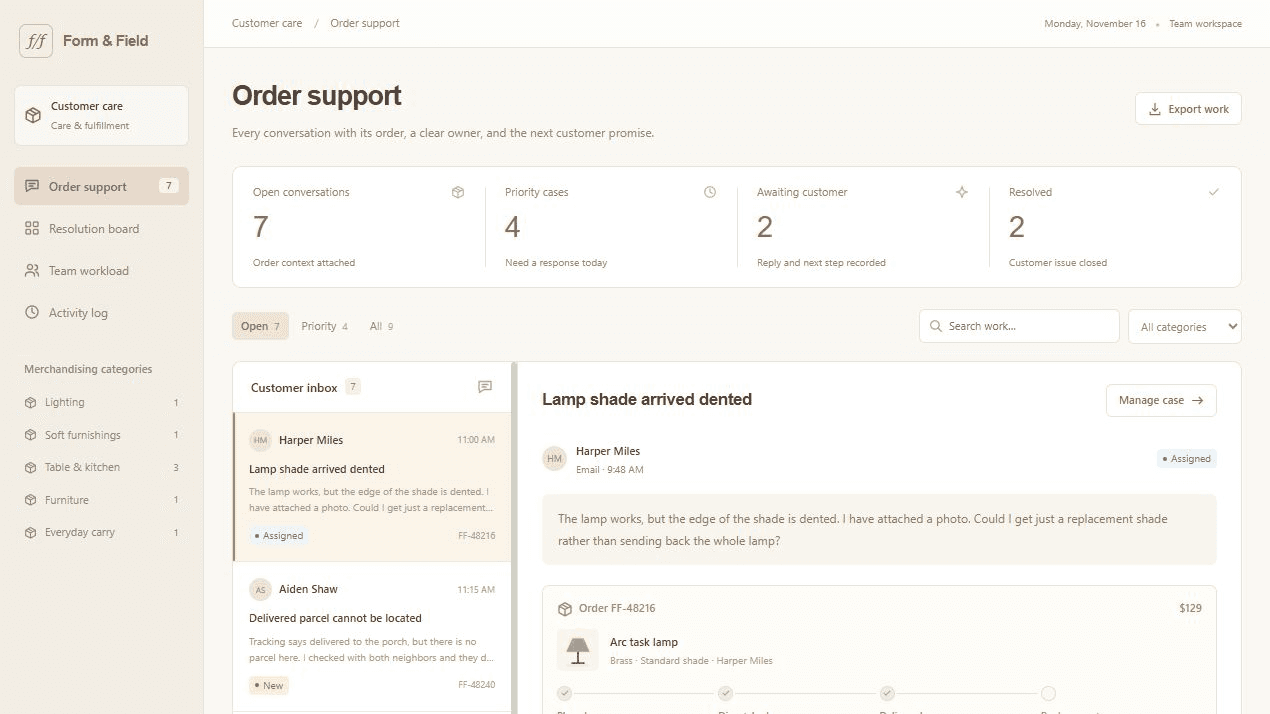
Customer support workspace
Resolve customer issues with the order in view. Review the conversation, assign the service owner, and approve a reply with the recovery steps attached.
Explore the template and starting prompt
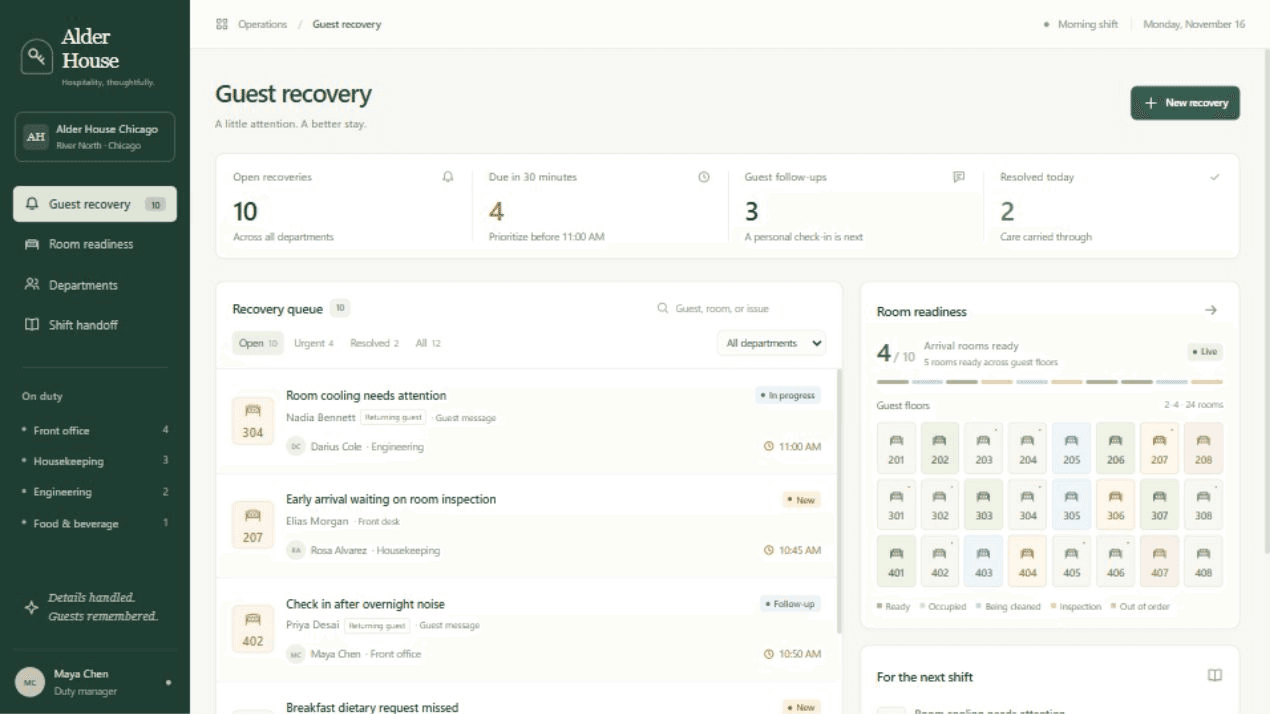
Guest experience monitor
Run guest service recovery around the stay. Assign room issues to the right department, review guest replies, and carry every open case into the next shift.
Explore the template and starting prompt