Find missing claim documents before an adjuster opens the file
How an AI agent compares a loss notice with the evidence that has arrived, lists what is still outstanding, and drafts the document request at intake, so the claim is not waiting on paperwork when the adjuster reaches it.

How can AI find missing documents in a claim file before an adjuster reviews it?
Have an agent compare the loss notice with the evidence that has arrived and draft outstanding document requests at intake. The adjuster sends the request, or your team's rules do. This lets document collection begin before review, rather than waiting for the adjuster to discover the gap. If the loss notice is too thin to identify the necessary evidence, the adjuster scopes the file first. Coverage, reserve and settlement decisions remain with your team.
What Siftree is: an AI-native IT department for your team. Describe the outcome through your existing AI connected over MCP, and we manage data integration, the data and AI platform, app and agent cloud, and security. This article compares platforms from their public documentation; check the sources, plans, and integrations against your own requirements.
Start the document request before review begins
An adjuster can open a claim file and find that an engineer's report, an inventory or a police report has never been requested. The review then uncovers collection work that could have started earlier. Check for those gaps at intake so the request is ready before the adjuster reaches the file.
Use your team's evidence requirements for the line and circumstances of the loss. An engineer's report, inventory, invoices or police report may be required under that approved list; the agent should not treat every loss of a given type as needing the same documents. When a request is appropriate at intake, sending it then lets collection proceed while the claim waits for review.
That is the job for an agent. Siftree reads the loss notice and every attachment as it arrives, checks the file against your team's evidence list for that line of business, and drafts the request for whatever is outstanding. The adjuster sends it, or your team's rules send it. Coverage, reserves, and settlement stay with the adjuster. See the claims evidence review page for how the desk fits the rest of the insurance workspace.
Checklist · 0 of 7
Evidence a claim file should show before review
Your team's list for each line of business sets the bar. These are the checks the agent runs on every file, and each one is either in, requested, or flagged for the adjuster.
How the check runs from intake to review
Claim evidence rarely arrives in one place. Siftree reads it where it lands: Gmail and Outlook for email and attachments, Google Drive, Box, and Dropbox for files, and DocuSign for envelopes and their status. Everything is kept in one searchable database, so the agent compares the whole file, not one inbox.
When a claim opens, the agent lists the evidence the loss notice implies and marks what is already in. Anything outstanding goes into a drafted request to the policyholder or broker, sent from Gmail or Outlook. Your team decides which requests the adjuster approves first and which go out on their own under your rules.
Each new document is checked as it arrives. An estimate is compared with the loss notice item by item; a statement is compared with the incident report. The agent notes where they disagree and leaves the judgment to the adjuster.
On a schedule your team sets, the agent re-checks every open file, follows up on outstanding requests, and alerts the supervisor when a decision date is close and evidence is still missing. Siftree does not replace your claims system. Your adjusters record decisions there.
What the check looks like on one claim
The claims review desk at Harborline Mutual shows how this looks on one claim. Tidewater Marine Supply reported a warehouse roof collapse, claim CL-48217, assigned to adjuster Dana Whitfield. The loss notice names two things: the roof deck and the warehouse racking under it.
Claim CL-48217, from the broker's email to review
A broker emails the first notice of loss for a warehouse roof collapse that damaged the roof deck and the racking below it.
| Stage | What arrives | What the agent records | What a person does |
|---|---|---|---|
| Claim opens, Nov 10 | Broker email with the loss notice | Evidence list from the notice, including a structural engineer report and a racking inventory with invoices; request drafted for both | Dana Whitfield is assigned the claim |
| Check: Does the loss notice name every damaged item? | |||
| Photos, Nov 12 | The policyholder uploads 14 photos | Photos marked received on the evidence file | No action needed |
| Contractor estimate | A contractor estimate for the roof | Estimate matched against the loss notice; it covers the roof deck but not the racking | Dana sees the gap noted on the claim |
| Check: Does every item in the notice appear in an estimate? | |||
| Before review | Engineer report and racking inventory still outstanding | Both shown as requested; follow-up on schedule; claim listed under Decision due, two days out | Dana decides whether to review now or wait for the documents |
| Review | The file as it stands | A clear list of what is in and what is not | Dana makes the coverage and settlement decision |
The agent never decides whether the racking is covered. It shows that the estimate and the loss notice disagree, and the adjuster decides what that means.
The order matters. Because the racking inventory was requested when the claim opened, the gap in the contractor estimate did not start a new wait; it confirmed a request that was already out. Had the check waited for review, the request would have started the day Dana read the estimate against the notice herself. Priya Raman, the claims supervisor, sees the same claim at the top of the Decision due list with two documents outstanding, so nobody has to ask which files are at risk.
Which claims are waiting on documents, and has the request gone out?
The claims review desk, with every open claim by stage from new to evidence needed, in review, and ready to settle, and the evidence file on each one. Connect the Gmail or Outlook inboxes where broker and policyholder email arrives, the Google Drive, Box, or Dropbox folders that hold claim documents, and DocuSign.
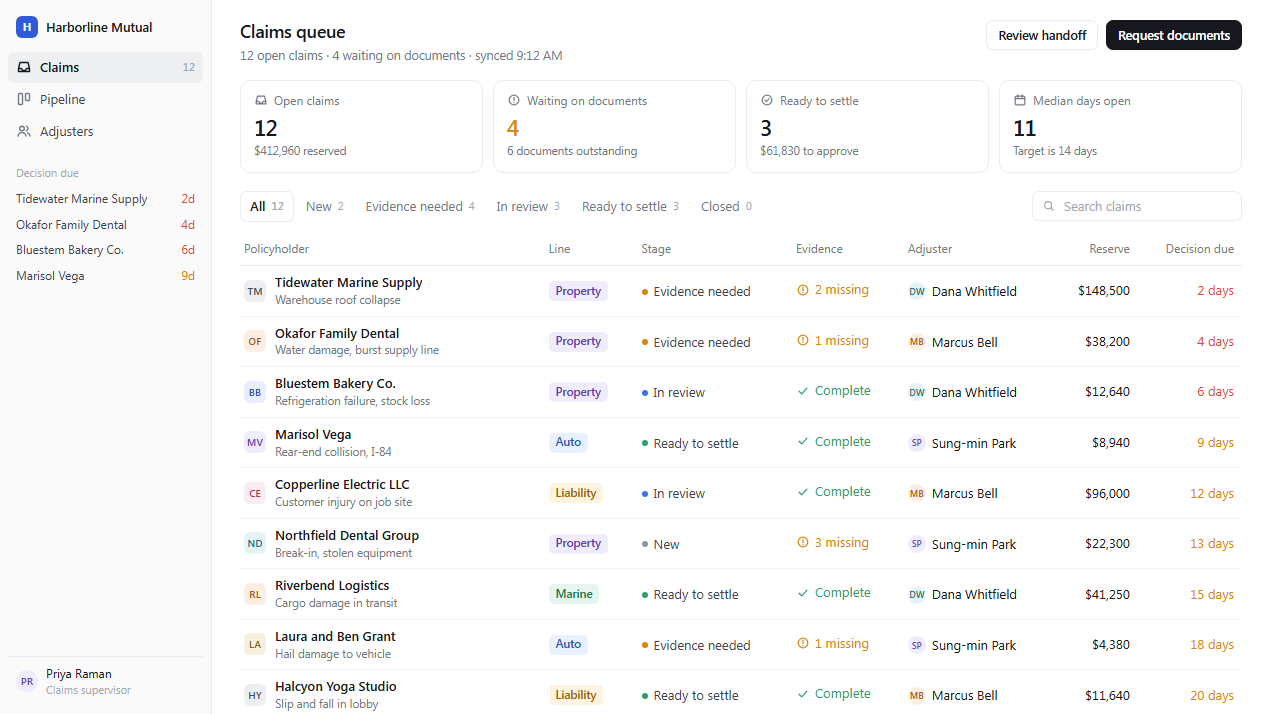
The claims review desk template starts with this queue. Siftree sets up the evidence lists, request wording, and review steps around the lines your team writes.
Frequently asked questions
How does the agent know which documents a claim needs?
From your team's evidence list for each line of business and from what the loss notice names. A notice that mentions damaged stock adds an inventory and invoices; a structural loss adds an engineer report.
Does the agent send document requests on its own?
Only where your team's rules allow it. Otherwise it drafts the request in Gmail or Outlook for the adjuster to review and send.
Does Siftree update our claims system?
No. It reads claim evidence from email and document stores, keeps the evidence file, and sends document requests. Your adjusters record stages and decisions in your claims system.
Who decides coverage, reserves, and settlement?
The adjuster or supervisor. The agent lists what is missing and flags where documents disagree; it does not recommend a coverage or settlement outcome.
What happens when the loss notice is too vague?
The agent marks the file for the adjuster to scope rather than guessing at a document list, and drafts the request once the adjuster has said what is needed.
Sources & methodology
Product details and supporting references used in this guide.

Co-founder, Siftree
Kyle co-founded Siftree after working in data across telecom, media, insurance, automotive, and entertainment and tourism. He writes Siftree's software comparisons and buying guides from the vendor documentation linked in each article.
See it with your own workflow.
Connect your agent, or have us build around your team's workflow. Bring the data you use, the work you want done, and where the result should go. We'll scope the app and required access with you.