Turn operator reports and machine alerts into maintenance work orders
How an AI agent completes a maintenance work order from an operator report or machine alert: matched asset, repair history, procedure, parts on hand, and downtime context, ready for the planner to schedule.

How do I turn operator reports and machine alerts into maintenance work orders with an AI agent?
An AI agent should complete the maintenance work order, not just open it. When a report or alert arrives, it matches the asset, pulls the repair history, attaches the procedure, checks parts on hand, and notes the production window, then writes the draft into MaintainX or UpKeep. The planner schedules and assigns. If a planner still has to look something up before scheduling, the agent should have filled it in. This changes when the report cannot be tied to one asset, or when the fault needs a safety call; then a person diagnoses first and the agent records the outcome.
What Siftree is: an AI-native IT department for your team. Describe the outcome through your existing AI connected over MCP, and we manage data integration, the data and AI platform, app and agent cloud, and security. This article compares platforms from their public documentation; check the sources, plans, and integrations against your own requirements.
Opening the order was never the slow part
Most maintenance teams can already create a work order in seconds. The time goes afterwards, when a planner works out which machine the report means, whether it failed the same way before, which procedure applies, whether the part is in the crib, and when production can give the machine up. Until those answers are on the order, it cannot be scheduled.
That is the work an agent should take on. Siftree reads operator notes, inspection rounds, and machine alerts from the tools you connect, completes the order with what the planner needs, and creates or updates it in the CMMS you connect. People still decide when the work happens, who does it, and whether the machine runs. See how this looks on the equipment maintenance page for manufacturing.
Checklist · 0 of 7
A work order is ready to schedule when it has
Use this as the bar for every draft the agent writes. Anything a planner would otherwise look up belongs on the order.
What the agent does between the report and the schedule
The report or alert arrives
An operator note, an inspection finding, or a condition-monitoring alarm reaches Siftree from the tool where it was written. Nobody retypes it.
The agent identifies the machine
It ties the report to one asset using the line, the machine name the operator used, and the alert source. If two machines fit, it lists both on the draft and flags it for the planner rather than guessing.
It reads the history
Past work orders, top-up logs, and earlier alerts for that asset are searched together, so a repeat failure is visible on the first day.
It attaches the procedure and checks parts
The matching procedure goes on the order, and each part is checked against stock and open purchase orders where your CMMS records them.
It writes the draft into your CMMS
The order is created or updated in the CMMS you connect, with the evidence attached, and appears on the maintenance board in the same state.
The planner schedules and assigns
The planner reviews the draft, sets the window, and assigns a technician. The agent never takes a machine out of service.
The agent follows it to a completion note
Status changes, parts delays, and the technician's findings are tracked until the order closes, and the record stays in your databases for the next failure.
Walk through the Press 4 hydraulic leak
At Kestrel Components, an operator on the stamping line reports oil pooling under the bolster of Press 4. The report is one sentence. Here is what the agent adds before Rosa Delgado, the maintenance planner, opens it.
It matches "Press 4" to asset PR-04, the 400-ton hydraulic press on the stamping line. It reads the reservoir top-up log and finds 11 gallons added since November 11, then finds work order WO-6104, a rod seal failure on the same cylinder last year. That points the draft at the main cylinder rod seal rather than a hose or fitting. It attaches the seal replacement procedure, from lockout and bleeding accumulator pressure through a pressure test at 3,000 psi for 15 minutes. It checks the crib and finds the seal kit in bin C-14, so no purchase is needed.
Rosa reads a complete order. She sets it as critical, schedules it, and assigns Luis Ortega, who locks out the press. The agent keeps the checklist and activity current as he works.
Which machines need work this week, and is each order ready?
The equipment maintenance desk, with work orders moving from reported to planned, in progress, waiting on parts, and completed, and downtime hours by line. Connect your CMMS and the tools where operator reports and machine alerts arrive.
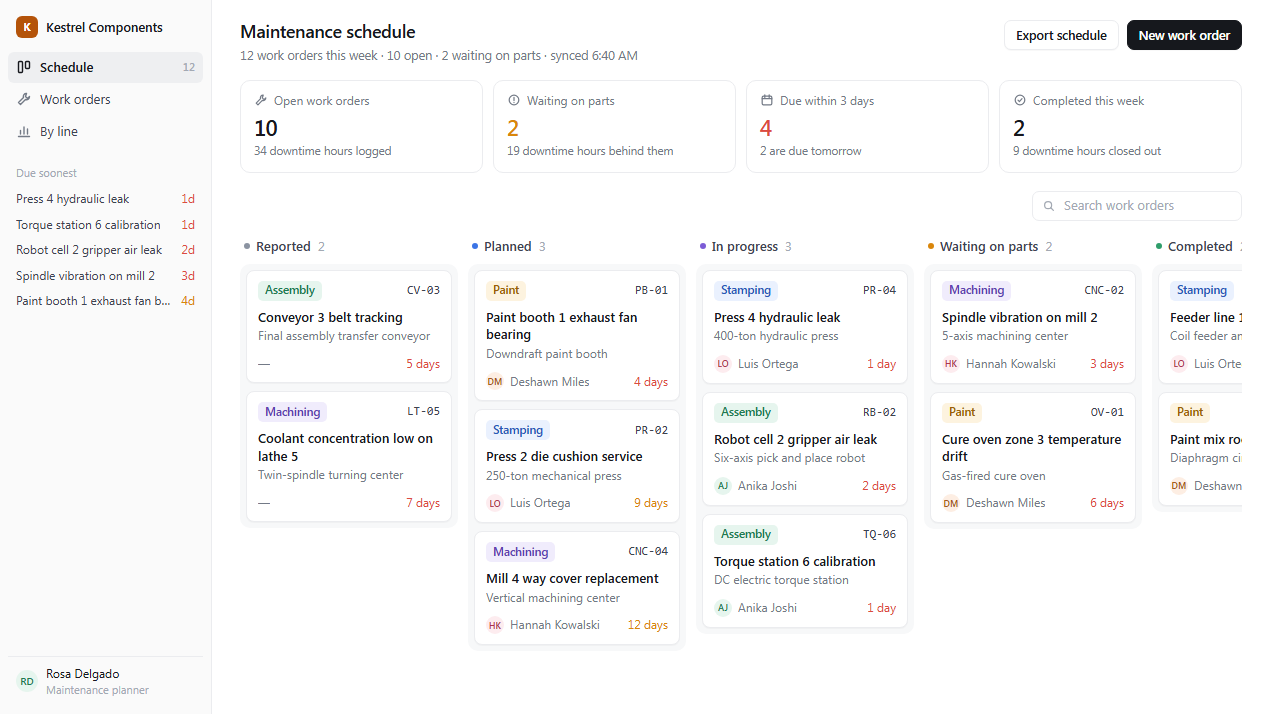
The table shows who supplied each part of the Press 4 order, so you can see where the agent stops.
| Part of the order | Press 4 hydraulic leak | Supplied by |
|---|---|---|
| Observation | Oil pooling under the bolster | Operator |
| Asset | PR-04, 400-ton hydraulic press, stamping | Agent |
| Likely cause | Main cylinder rod seal | Agent, from the top-up log and WO-6104 |
| Procedure | Rod seal replacement, ending with a 3,000 psi test | Agent |
| Parts | Seal kit in bin C-14 | Agent, from crib stock |
| Priority | Critical | Planner |
| Schedule and technician | Luis Ortega | Planner |
| Lockout and repair | Done at the press | Technician |
The equipment maintenance desk template starts with this board. Siftree adapts the asset records, procedures, and review steps to the machines your plant maintains.
Frequently asked questions
Where do operator reports and machine alerts come from?
From the tools you already use, such as operator notes, inspection rounds, chat, and condition-monitoring alerts. Siftree reads them as they arrive and keeps them in one searchable database.
Does the agent create work orders in our CMMS?
Yes, in MaintainX or UpKeep. It creates and updates work orders there through Siftree's connectors, so the order your team works from stays the record.
Who decides priority and timing?
The planner. The agent suggests a priority with its reason, but scheduling, assignment, and approval stay with people.
Can the agent take a machine out of service?
No. Siftree plans, assigns, and records the work. People and your control systems run the equipment.
What happens when a report is too vague to match an asset?
The agent flags the draft for the planner, with the candidate assets, rather than attaching it to the wrong machine.
Sources & methodology
Product details and supporting references used in this guide.

Co-founder, Siftree
Kyle co-founded Siftree after working in data across telecom, media, insurance, automotive, and entertainment and tourism. He writes Siftree's software comparisons and buying guides from the vendor documentation linked in each article.
See it with your own workflow.
Connect your agent, or have us build around your team's workflow. Bring the data you use, the work you want done, and where the result should go. We'll scope the app and required access with you.