Add AI agents to maintenance without replacing your CMMS
Keep your CMMS as the maintenance record and add an agent layer around it. Three tests decide whether it works: where reports arrive, whether drafts land in the CMMS, and who approves them.

Can I add AI agents to maintenance without replacing our CMMS?
Yes. Keep the CMMS as the record and add agents around it. Judge any agent layer on three tests: it reads reports where they already arrive, its drafts land in your CMMS rather than a second queue, and a named person approves before work is scheduled. If a layer fails any test, it adds a system instead of removing work. The answer changes when the CMMS itself is the problem: if asset history is missing or nobody records work there, fix the record first, because an agent completes orders from that history.
What Siftree is: an AI-native IT department for your team. Describe the outcome through your existing AI connected over MCP, and we manage data integration, the data and AI platform, app and agent cloud, and security. This article compares platforms from their public documentation; check the sources, plans, and integrations against your own requirements.
Keep the CMMS as the record and put agents around it
A CMMS is where work orders, asset history, and completion notes are kept, and where audits and reliability reviews look. Replacing it to get AI means migrating years of history and retraining every technician. You rarely need to.
The work an agent can take on mostly happens outside the CMMS: reading an operator's message in chat, noticing an alarm, finding last year's repair on the same machine, checking the parts crib, and drafting the order. Siftree does that work and then creates and updates work orders in the CMMS you connect. The CMMS stays the system everyone works from. As the equipment maintenance page puts it, Siftree prepares and tracks the work and keeps your existing system updated.
So the real question is not which AI to buy, but whether an agent layer removes work or adds a second place to check. Three tests answer that, and the checklist below turns them into what to verify.
Checklist · 0 of 6
Test an agent layer before you commit to it
Each item is something you can verify in a trial on your own reports and your own CMMS.
Draw the line at the machine
The last test is the one to settle in writing before a trial starts. An agent that prepares work is useful. An agent that acts on equipment is a control-system change, with a different owner and a different review. Siftree's manufacturing FAQ states where Siftree stops:
That boundary also decides who approves. Planners schedule and assign, supervisors decide priority when production and maintenance disagree, and technicians lock out and release machines. The agent's job is to make each of those decisions faster by putting the evidence on the order.
Run the trial on one line or one depot
Pick one area with steady reports
One production line or one depot, where reports arrive every shift and planners can compare drafts with what they would have written.
Connect where reports arrive and your CMMS
Connect the chat, inspection, and alert tools people already use, and MaintainX or UpKeep. Siftree collects the asset history it can reach and builds what it needs in its databases.
Let the agent draft every order
Each report becomes a draft with the asset, history, procedure, parts, and downtime context, written into the CMMS for review.
Have planners approve or correct each draft
Corrections are recorded on the order, so the asset's history shows what planners changed. Review them at the end of the trial.
Check the three tests against real orders
Did any report go unread, did any draft fail to reach the CMMS, and did anything get scheduled without an approver? Any yes is a reason to stop and fix before expanding.
Expand to the next area
Add lines, depots, or report sources one at a time, keeping the same approvers and the same record.
The same layer works for a fleet
On the fleet maintenance page, the reports are driver observations and the deadline is the next dispatch, not the next production window. The agent connects the observation with the vehicle's service history and its next route assignment, then prepares the bay booking, parts, and technician handoff for the maintenance team to schedule.
Which vehicles need service before their next dispatch?
The maintenance desk set up for a fleet, with a service queue that shows each observed issue, the equipment record, and the procedure before work is scheduled. Connect your CMMS and the tools where drivers and technicians report problems.
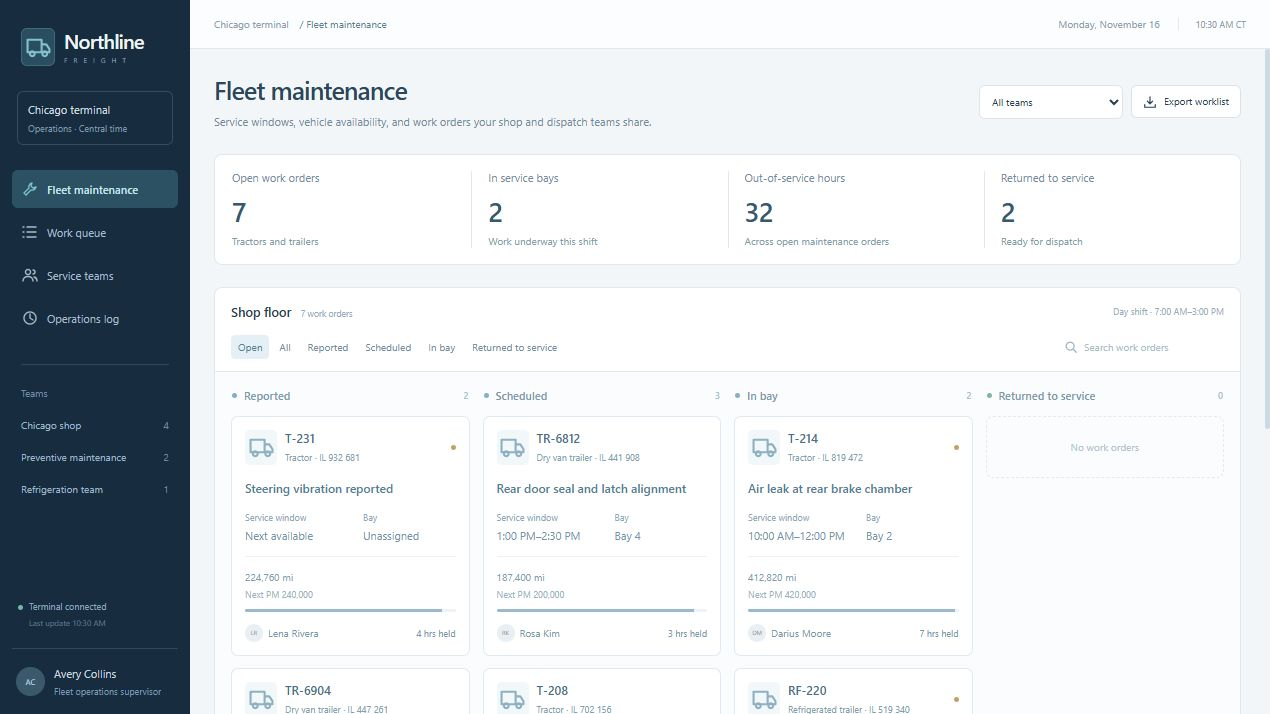
The equipment maintenance desk template is the same starting point for a plant or a fleet; Siftree adapts the equipment records, procedures, and review steps to the assets you maintain.
Frequently asked questions
Does Siftree replace our CMMS?
No. It prepares and tracks the work and keeps your existing system updated. Work orders are created and updated in MaintainX or UpKeep through Siftree's connectors.
What if our CMMS already has an AI assistant?
Use the three tests on it too. The difference to check is whether it reads reports from outside the CMMS and whether it can write drafts without someone copying them in. For what each vendor documents, see [CMMS AI assistants compared](/guides/cmms-ai-assistants-compared).
Who is accountable for a draft the agent wrote?
The person who approves it. The agent attaches the evidence it used, so the approver can see why the order says what it says.
Do technicians need to learn a new tool?
Not to do the work. Orders arrive in the CMMS they already use, and the maintenance desk gives planners a board across lines or depots.
Does the agent keep working outside shift hours?
Yes. Siftree runs in the cloud and keeps processing reports after your team logs off, so drafts are waiting for the planner at the start of the next shift.
Sources & methodology
Product details and supporting references used in this guide.

Co-founder, Siftree
Kyle co-founded Siftree after working in data across telecom, media, insurance, automotive, and entertainment and tourism. He writes Siftree's software comparisons and buying guides from the vendor documentation linked in each article.
See it with your own workflow.
Connect your agent, or have us build around your team's workflow. Bring the data you use, the work you want done, and where the result should go. We'll scope the app and required access with you.