Investigate a missed carrier milestone and assign the recovery with AI agents
How an AI agent handles a shipment exception from the missed milestone to closeout: what is confirmed, what is not, a drafted recovery action and customer update, and a dispatcher who approves both.

How do I manage shipment exceptions with AI agents?
Treat an exception as open until two things have an owner: the recovery action and the customer update. An AI agent watches carrier milestones, opens the exception when one is missed, states what is confirmed and what is not, and drafts both. A dispatcher approves. The agent never publishes an arrival time the carrier has not confirmed. The rule changes when a carrier sends no tracking at all: then the exception opens on the missed time, and the recovery starts with the dispatcher reaching the carrier.
What Siftree is: an AI-native IT department for your team. Describe the outcome through your existing AI connected over MCP, and we manage data integration, the data and AI platform, app and agent cloud, and security. This article compares platforms from their public documentation; check the sources, plans, and integrations against your own requirements.
An exception closes when two jobs have owners
Most shipment exceptions are noticed. Fewer are finished. A tracking gap gets spotted, someone emails the carrier, and the load drifts until the customer calls to ask where it is. The problem was never detection. It was that nobody owned the recovery, and nobody owned what to tell the customer.
So set the bar there. An exception is resolved only when the recovery action has a named dispatcher and the customer update has been approved and sent. The agent's job is to get both to the dispatcher ready to approve: what the carrier has confirmed, what it has not, the next recovery step, and a customer update written only from the confirmed facts. It never invents an ETA. See how this runs on the shipment exception recovery page.
Trace one load from the missed milestone to closeout
Load LD-8439 is a Meadow Retail shipment from Indianapolis to Milwaukee with Lakebend Carriers, due at the receiver at 3:00 PM. The carrier recorded a terminal departure at 6:52 AM. As of 10:25 AM, no location event has followed. Here is who does what.
LD-8439, tracking gap after terminal departure
Carrier milestone: departed the Indianapolis terminal at 6:52 AM. No later location event as of 10:25 AM.
| Stage | Agent | Dispatcher |
|---|---|---|
| Detect | Sees that the expected location update after departure has not arrived and opens an exception on LD-8439, with the hours since the last event counted. | Sees a new, unassigned exception at the top of the queue. |
| Check: The exception names the missed milestone and the time of the last confirmed event. | ||
| Confirm | Records what is confirmed (departure at 6:52 AM) and what is not (current location, revised arrival). Marks the ETA as unconfirmed. | Reads the carrier evidence beside the investigation note. |
| Check: No arrival time appears that the carrier did not send. | ||
| Recover | Drafts the recovery step, asking Lakebend dispatch for driver contact and a location update, and suggests Maya Bennett on the Midwest desk as owner. | Maya accepts ownership and contacts the carrier. |
| Check: The recovery has a named owner before the customer is told anything. | ||
| Notify | Drafts the Meadow Retail update from the confirmed facts, saying the load is in transit and a confirmed arrival will follow. | Approves the update, edits it, or holds it until the carrier answers. |
| Check: The update makes no promise the carrier has not confirmed. | ||
| Close | When Lakebend confirms a location and revised arrival, records them with their source and keeps the load under watch to delivery. | Confirms the outcome and closes the exception. |
| Check: The closing note says what happened, who confirmed it, and when. | ||
Revised times stay tied to carrier updates. Until Lakebend confirms one, the arrival on LD-8439 stays marked unconfirmed.
Nothing in that trace is guessed. The agent separated the one confirmed fact from the open questions, drafted the next step, and stopped at the two decisions that belong to a person: who owns the recovery, and what the customer hears.
What the agent does on every load
Read carrier updates as they arrive
Siftree reads tracking from FedEx and UPS, tracking status changes from AfterShip, and carrier emails in Gmail or Outlook. Runs repeat on a schedule, so a missed update is noticed even when nothing new arrives.
Compare each load against its timeline
Each update is checked against the expected pickup, departure, and delivery milestones. A late pickup, lost tracking, a missed delivery, or a customs hold opens an exception with the hours already counted.
Separate confirmed facts from open questions
The exception lists what the carrier has confirmed and what it has not. Revised times stay tied to carrier updates, and anything unconfirmed stays visible as an open investigation question.
Draft the recovery and the customer update
The agent proposes the next recovery step and an owner, and writes the customer update from the facts on the load.
Alert the desk and wait for approval
Unassigned exceptions are listed first, and Siftree can alert the desk in Slack. The dispatcher assigns the recovery and approves the update, which is sent on approval or automatically under rules you set.
Record the outcome
The carrier conversation, the confirmed outcome, and the customer update stay with the load in Siftree's databases, so hours late and open exceptions by carrier are ready for the next rate conversation.
Which loads missed a milestone, and does each one have a recovery owner?
The shipment exception console set up for a dispatch desk, with exceptions across carriers, the carrier evidence beside each investigation note, and status from new to resolved. Connect FedEx, UPS, or AfterShip tracking and the Gmail or Outlook inbox where carrier emails arrive.
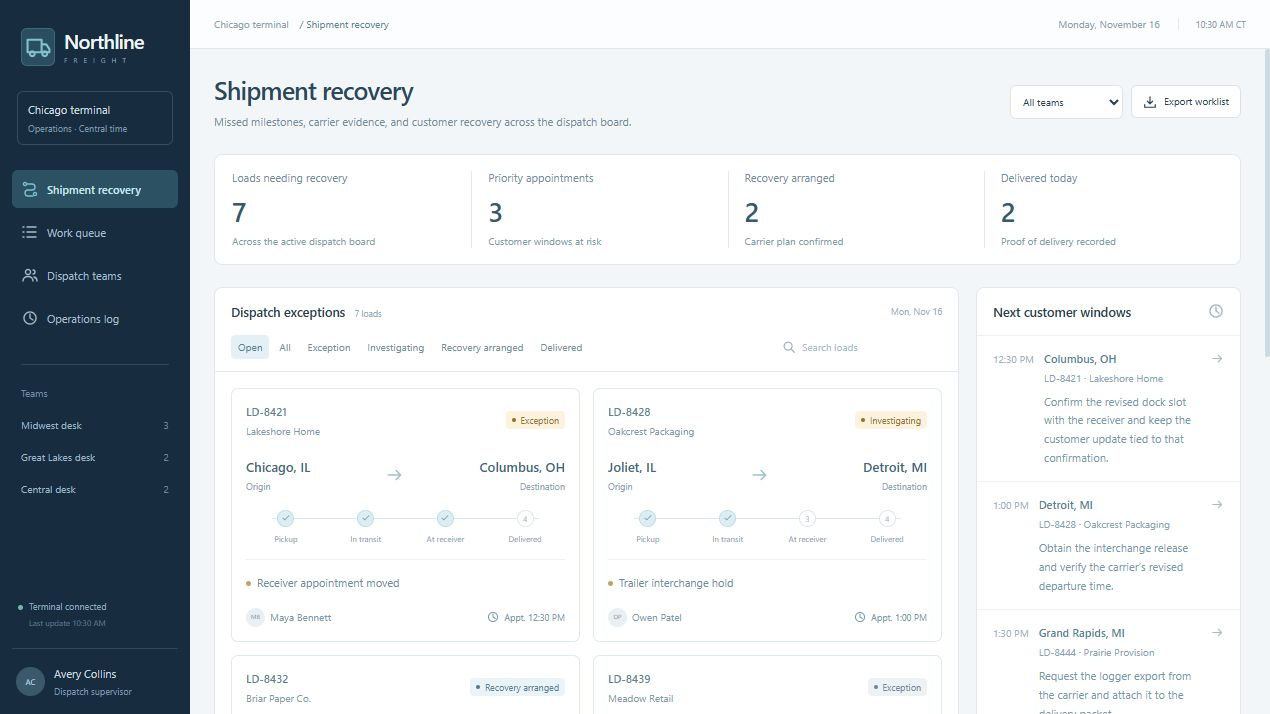
The shipment exception console template starts with this queue. Siftree adapts the milestones, carriers, and approval steps to the lanes your desk runs.
Frequently asked questions
Which carriers does it follow?
The carriers and tracking feeds you already use. Siftree reads tracking from FedEx, UPS, and DHL, tracking statuses from AfterShip, and carrier emails in Gmail or Outlook, then flags the gaps.
Does the agent ever set a new ETA?
No. Revised times stay tied to carrier updates. When no confirmed time exists, the exception shows it as an open question.
Can it notify customers?
Yes. Updates are drafted from the facts on the load and sent when a dispatcher approves, or automatically under rules you set.
Who owns the recovery?
A named dispatcher. The agent suggests an owner and the next step; the dispatcher accepts, reassigns, or changes it.
Does this replace our transportation management system?
No. It works alongside your existing systems to organize the evidence, the investigation, and the follow-up.
Does it keep working after the desk closes?
Yes. Siftree runs in the cloud and keeps processing carrier updates after your team logs off, so new exceptions are waiting at the start of the next shift.
Sources & methodology
Product details and supporting references used in this guide.

Co-founder, Siftree
Kyle co-founded Siftree after working in data across telecom, media, insurance, automotive, and entertainment and tourism. He writes Siftree's software comparisons and buying guides from the vendor documentation linked in each article.
See it with your own workflow.
Connect your agent, or have us build around your team's workflow. Bring the data you use, the work you want done, and where the result should go. We'll scope the app and required access with you.