Handle late loads without a visibility platform
Catch late loads from carrier tracking, carrier emails, portal milestones, and appointment windows: what each input tells you, what it cannot, and how an agent works from them without inventing an ETA.

How do mid-size shippers handle late loads without a visibility platform?
Start with carrier tracking, carrier emails, portal updates forwarded to your inbox, and delivery windows. An agent can watch those inputs, flag a missed update, and draft the recovery and customer message while keeping unknown timing explicit. Review a recent operating period: which loads had usable updates, where did information stop, and could dispatch work the exceptions in time? Start with Siftree when those inputs support the recovery your desk needs. Evaluate a visibility platform when missing carrier connectivity leaves material gaps; there is no universal coverage percentage that settles this.
What Siftree is: an AI-native IT department for your team. Describe the outcome through your existing AI connected over MCP, and we manage data integration, the data and AI platform, app and agent cloud, and security. This article compares platforms from their public documentation; check the sources, plans, and integrations against your own requirements.
Start with the updates your carriers actually provide
A visibility platform can bring carrier updates into a shared feed. Without one, the information available to your desk depends on the carriers and lanes you use. Some carriers publish tracking, others send milestones by email, and some updates remain in a portal until someone passes them on. Receivers may supply appointment windows. Review those inputs before assuming the desk has enough information to investigate a delay.
That is the job to hand to an agent: watch every input you already have, open the exception when an expected update does not arrive, and draft the recovery and customer update. The condition is that it reports what it does not know. A missing scan is a fact. A new arrival time that no carrier sent is a guess, and a guess sent to a customer becomes your promise.
What each input can and cannot tell you
Each source answers a different question. The gaps matter as much as the coverage, because they decide what the agent can confirm and what it has to leave open.
| Compare | What it tells you | What it cannot tell you |
|---|---|---|
| Carrier tracking (FedEx, UPS, DHL) | Each scan and status event, with time and location, as the carrier records it | Where the shipment is between scans, or when it will arrive if no estimate is posted |
| AfterShip tracking statuses | Status changes across the carriers AfterShip already follows | Anything the underlying carrier did not report |
| ShipStation order status | Where the order stands in fulfillment, such as shipped or awaiting shipment | Where the shipment is after it leaves your dock |
| Carrier emails | Pickup confirmations, delays, recovery drivers, and revised times the dispatcher writes down | Anything between emails; silence is not confirmation |
| Carrier portal milestones | Milestones such as loaded, departed, or released, when someone checks the portal | When the next milestone will post, or why one is late |
| Appointment windows | The time the receiver expects the load, and whether that window moved | Where the load is; a window is a deadline, not a location |
| Route events from your own fleet in Samsara | When your own routes start and when stops are completed | Anything about loads handed to outside carriers |
Portal milestones and appointment changes count when they reach your Gmail or Outlook inbox. The "What it cannot tell you" column is the list of things the agent must mark as unconfirmed until a carrier fills them in.
Set up exception handling on the inputs you have
Connect the inputs that carry tracking
Siftree reads tracking from FedEx, UPS, and DHL, tracking statuses from AfterShip, order status from ShipStation, route events from Samsara, and carrier emails and attachments in Gmail or Outlook. Siftree keeps them together in its databases, so each load's history is in one place.
Put the promise beside the last update
Each load shows the last carrier update and the promised delivery window together, so a gap between them is visible without opening three tools.
Watch for silence on a schedule
Scheduled runs check every open load. When an expected milestone has not arrived by its time, the agent opens an exception with the hours already counted, even if the carrier sent nothing.
Keep unknowns explicit
Carrier estimates remain attributed to the carrier. Missing or uncertain timing stays marked while your team investigates, and the agent does not estimate a new one.
Draft the recovery and the customer update
The agent proposes the next step, such as a hub trace or a request for proof of delivery, and drafts the customer message from confirmed carrier information only.
A person approves and owns it
Every exception gets a named owner. Updates are sent when that person approves, or automatically under rules you set.
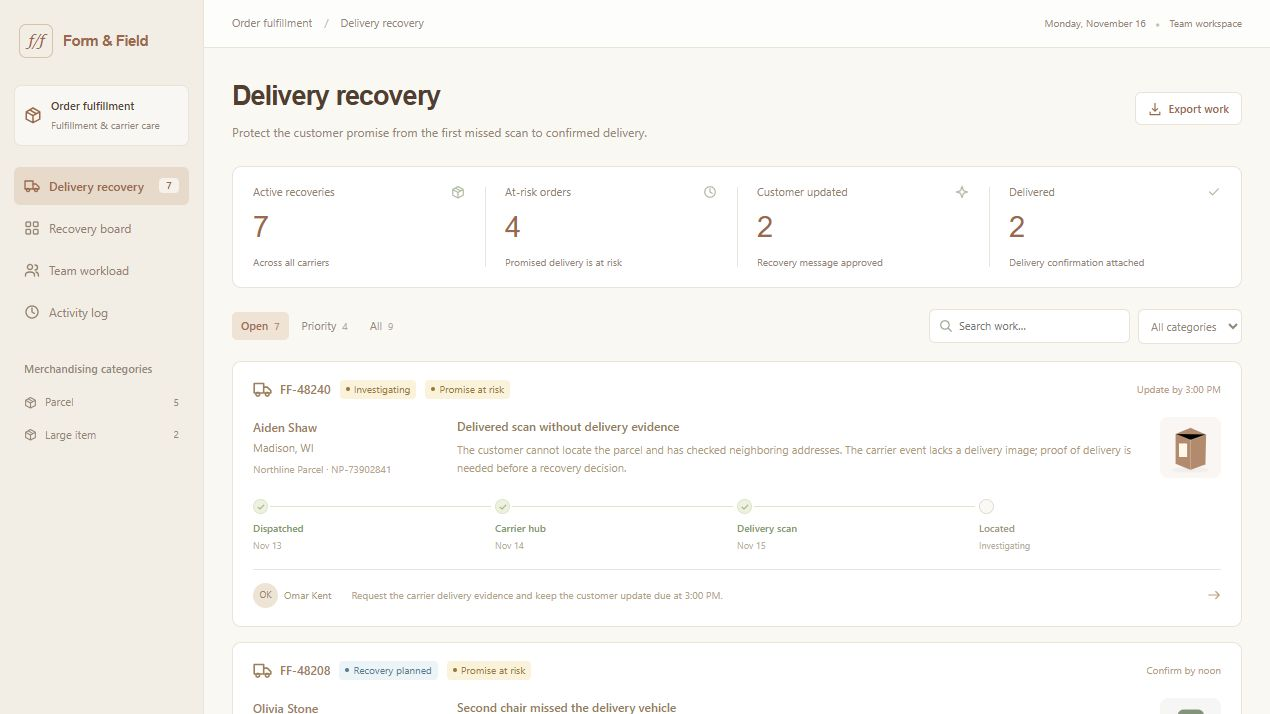
Here is how that looks on one order. Order FF-48231, an arc task lamp going to Ann Arbor with Parcelway, was received at the regional hub on November 13 at 11:08 PM, with no onward departure recorded and a November 16 delivery promise at risk. The agent proposes a hub trace and drafts the carrier request and customer message for the dispatcher. The message contains no arrival time because no carrier has confirmed one.
Which delayed orders need a customer update today?
The delivery exceptions workspace for a fulfillment team, with the missed milestone and the promised delivery window side by side, a recovery owner on each order, and a customer update prepared from confirmed carrier information. Connect FedEx, UPS, DHL, or AfterShip tracking, ShipStation order status, and the Gmail or Outlook inbox where carrier emails arrive.
When a platform starts to pay
Review a recent operating period by carrier and lane. Check which loads had usable updates, which delays stayed unconfirmed, and whether dispatch could investigate and communicate within the required windows. An agent watching your existing inputs is useful when that information supports the recovery work your desk needs. A visibility platform deserves evaluation when missing connectivity leaves material lanes or customer commitments uncovered. There is no universal percentage of tracked loads that establishes the right purchase.
The agent can flag a missed expected update on an email-only carrier, but finding the shipment still depends on someone reaching that carrier. For what visibility platforms' agents are documented to do, see our comparison of exception agents.
Start from the delivery exceptions page for retail or the shipment exception console template.
Frequently asked questions
Can an agent catch a late load if the carrier sends no updates?
It can catch the silence. When an expected milestone has not arrived by its time, the agent opens an exception. Finding out where the load is still needs the carrier.
Does it infer a new delivery time?
No. Carrier estimates remain attributed to the carrier. Missing or uncertain timing is kept explicit while your team investigates.
Which tracking sources does Siftree read?
FedEx, UPS, and DHL tracking, AfterShip tracking statuses, ShipStation order status, Samsara route events, and carrier emails in Gmail or Outlook.
Do we need a transportation management system first?
No. Siftree works from FedEx, UPS, and DHL tracking, AfterShip, ShipStation, and carrier email, alongside a TMS if you have one.
Who sends the customer update?
Your team, or rules your team sets. Updates are drafted from confirmed carrier information and sent when an owner approves, or automatically under rules you set.
Sources & methodology
Product details and supporting references used in this guide.

Co-founder, Siftree
Kyle co-founded Siftree after working in data across telecom, media, insurance, automotive, and entertainment and tourism. He writes Siftree's software comparisons and buying guides from the vendor documentation linked in each article.
See it with your own workflow.
Connect your agent, or have us build around your team's workflow. Bring the data you use, the work you want done, and where the result should go. We'll scope the app and required access with you.