Can Claude find business contact information? Build lead research in Claude
See how Claude researches companies and business contacts through a Siftree connection, including matching, enrichment, and source evidence for your CRM.

Can Claude find business emails and company contact information?
Yes. Add Siftree to Claude as a connector and describe the companies, roles, or leads you want to research. Siftree gathers company and contact information, matches duplicates, enriches records, and saves the results in your databases. Claude returns a prioritized list with the reason each person fits, plus source evidence and any available verification status, so your team can check a contact before using it.
How this workflow fits: Siftree is an AI-native IT department for your team. Ask for a prospecting solution through your existing AI connected over MCP. Siftree builds and runs the solution within your budget, managing integrations, models, databases, hosting, and access controls. Explore the sources and connections for your workflow through the available integrations.
Claude can reason about leads; Siftree supplies the data
Ask Claude for the operations lead at a target account and it can tell you what role to look for. It cannot look the person up. Connecting Siftree to Claude adds the missing part: access to company and contact sources, matching, and a place to keep the results.
Which accounts should a rep work this week?
A pipeline workspace in Siftree, where researched accounts and contacts sit with the reasons they were prioritized.
Prospecting
Accounts
- Brightline HVAC Hiring 3 dispatchers 9
- Polar Plumbing Co. Routewise complaint 9
- Summit Pest Control Asking for tools 8
- Keystone Electric Ops manager role 7
Brightline HVAC
Denver, CO · 60 technicians
Why now
3 dispatcher roles posted in five days
Opening a second location in Aurora
First touch · draft
Hi Maya, saw Brightline is opening a second location in Aurora. That’s usually when routing by hand starts to cost overtime…
Review before sending
Describe the account, not the lookup
Find operations leaders at mid-size logistics companies in the
Southeast. Include their role, the company's recent news, and
why each one is worth a conversation. Save the list and flag
anyone already in our CRM.
Siftree runs the research, matching, and storage behind this request.
Three jobs that get called "finding contacts"
Each job answers a different question, and Claude can combine them in one request.
Discovering contacts
- Starts from a target market or role, not a known person.
- Returns candidates who fit the account.
- Best when you do not yet know who to reach.
Enriching known records
- Starts from a company or contact you already have.
- Adds missing business details and context.
- Best when your CRM has gaps rather than too few leads.
Company research then explains why an account matters: what it does, what changed recently, and whether it fits your business.
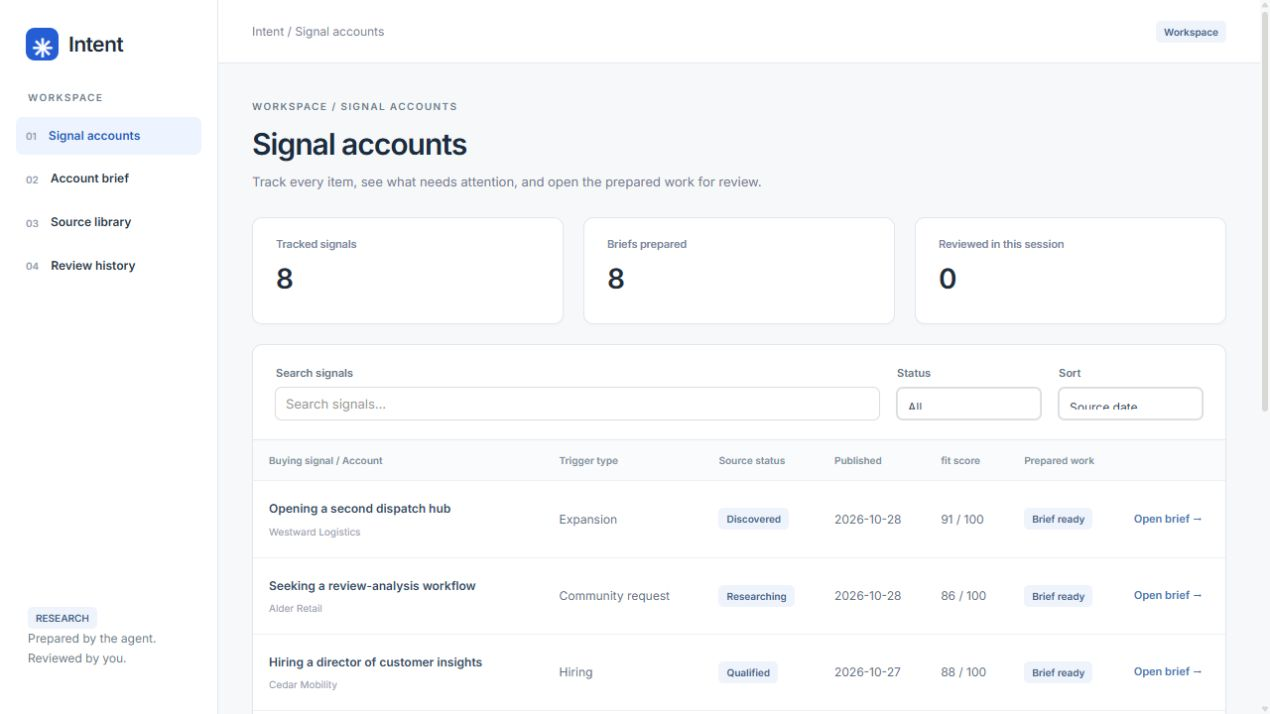
Which accounts show a reason to buy?
The buying-signal workspace, with each account's evidence, why-now note, and prepared handoff.
What a trustworthy result looks like
A contact is only useful if you can judge how far to trust it. Ask Claude to keep these visible for every person it returns.
Checklist · 0 of 5
Check before a contact goes into your CRM
A good result shows its work. If any of these are missing, ask Claude to add them.
Duplicate handling and identity resolution happen inside Siftree. Where a match is uncertain, the result says so instead of presenting a guess as fact.
Keep the research working for you
Contact research is stored in your persistent databases. Search accounts by description, count how many have a matching operations contact, or ask which researched companies are expanding into a region. A connected CRM becomes part of the picture, so existing relationships appear next to new leads.
Finding a contact and contacting them stay separate steps. Research does not send a message.
Frequently asked questions
Do I need my own Apollo or Hunter account?
Siftree handles access to the sources it connects. The integration pages describe the available options.
Will Claude invent an email address?
The aim is the opposite. Results carry their source and any available verification status, and unavailable details stay visibly unavailable.
Can the research update my CRM?
Siftree can connect to your CRM, so existing records inform the research. Describe what you want written back and it is scoped with you.
Is this different from using ChatGPT?
The research, matching, and storage are the same because they live in Siftree. Only the assistant you talk to changes.
To go further, follow the contact research workflow, explore contact enrichment, or read the ChatGPT take on this question in Can ChatGPT find business contact information?.
Sources & methodology
Product details and supporting references used in this guide.

Co-founder, Siftree
Kyle co-founded Siftree after working in data across telecom, media, insurance, automotive, and entertainment and tourism. He writes Siftree's software comparisons and buying guides from the vendor documentation linked in each article.
See it with your own workflow.
Start with Prospecting, or have us build around your team's workflow. Bring the data you use, the work you want done, and where the result should go. We'll scope the app and required access with you.